
From Photo to Painting Plan: A New Forest Autumn, Mentored by Blue
2 Oct 2026 · @Martin
A walk in the woods, and a lot of choices
ZincBlue is made by me, a painter, for painters. I’ve had an established teaching business teaching oils to classes for over two decades, so the acid test of this has to be with and for my students.
Today is a painting day, so rather than talk about ZincBlue in the abstract, I used one photograph (the kind painters just love to work from) and decided to walk it all the way to a painting plan in front of the group using ZincBlue over this month’s painting project. This post follows that journey step by step, so you can do the same with your own project.
The reference is a path through the New Forest in autumn. Tall Scots pines, a canopy of burnt orange and gold, a strip of bright blue sky, and a lone walker heading away from us down the track. It is a good photograph. It could be painted exactly as it is, and that is always an option.
But a reference is a starting point, not a set of rules. The real question is: what do you want to say about this scene? ZincBlue is built to help you explore that question, try ideas out safely, and then turn the idea you choose into a practical plan you can follow at the easel. At every stage, Blue (your studio mentor) offers options and explains them. You make the decisions.
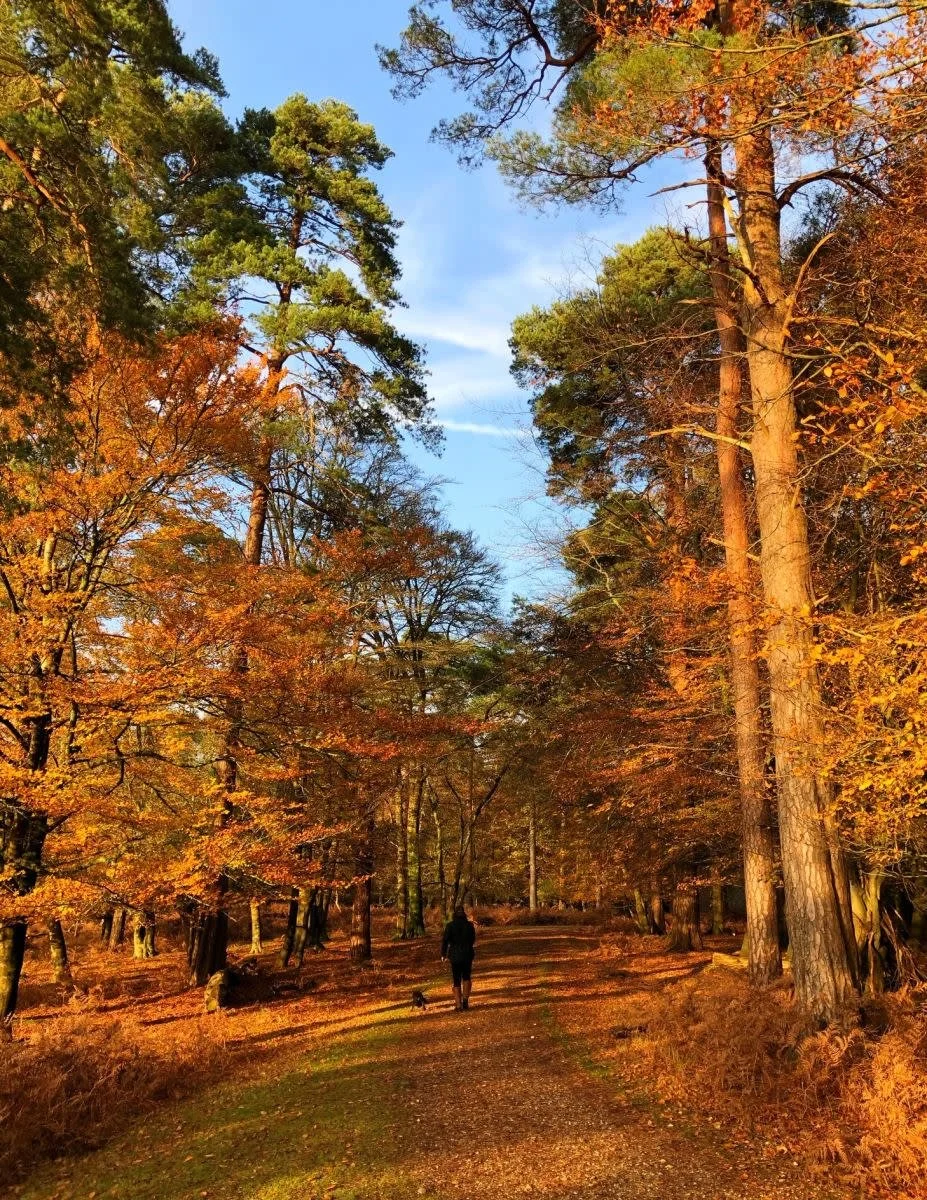
Our starting point
The New Forest in Autumn
Step 1: Start a project and choose the look you want
Every project begins on the Start a new painting page. First you tell ZincBlue which medium you're working in. I chose Oil Paint, and you can change it at any time with a single click. Everything Blue suggests from this point on, from colour names to mixing advice, is shaped around that medium.
Next comes one of my favourite features: The look you want. You add a painting whose style you'd like your picture to move toward. Your own reference stays exactly as it is: the same scene, the same view. Only the painting of it changes.
For this demo I chose an autumn painting in the spirit of Tom Thomson, the Canadian painter whose bold, broken colour and thick, energetic marks turned northern forests into something close to a blaze. I wanted to see what my quiet English woodland might become with some of that energy in it.
You then have two clear choices:
Use this painting, which carries the style idea forward through the rest of the project.
Skip: paint my reference as it is, if you're happy with the photograph's own character.
Neither is the "right" answer. This is the first of many points where ZincBlue opens a door and lets you decide whether to walk through it.
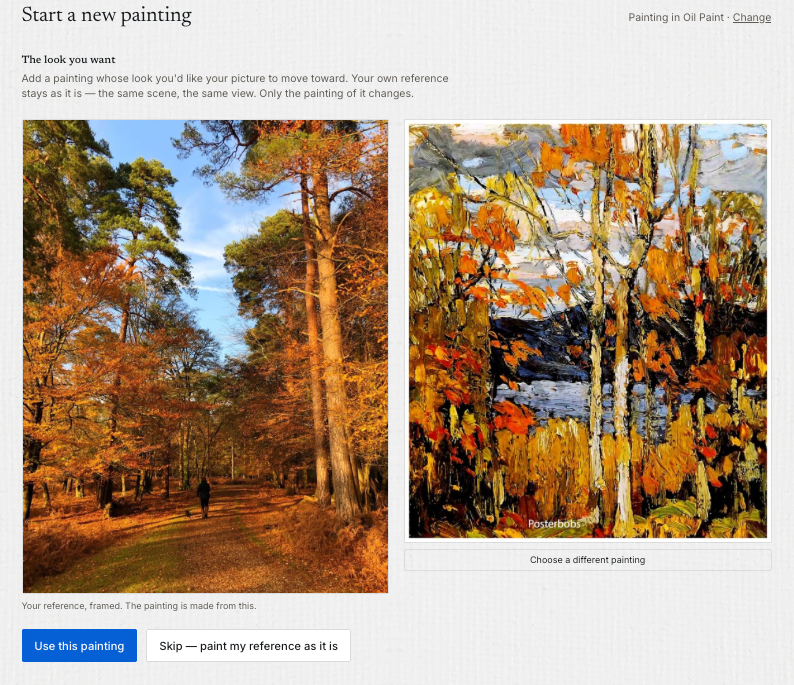
What would happen if we introduced a little knife impasto and reduced the detail? Tom Thomson’s work might be a great way to visualise that move in our reference.
Step 2: Try the composition before you commit
Most images can be improved by deciding what to keep, what to leave out, and where the main subject sits. A strong composition often balances a smaller area of activity against larger areas of calm. The Composer lets you test this in seconds, before a single brushstroke.
You start by matching the shape of your support. The options are Full frame (your whole image), 1:1 square, 5:4, 4:3, 3:2 and Round. Then you drag the frame to position it, and use the Size slider to come in closer. Working from a reference that already matches your canvas makes the painting far easier to plan and develop.
Blue also offers suggestions. On my photograph it noted that there's a lot of open ground around the subject, and that coming in closer often makes a stronger picture. That's a useful prompt, but it's a prompt, not an instruction.
The best part is the shortlist. You can save up to three compositions side by side, tap any one to look again, then choose the strongest to carry on. I tried:
a 3:2 landscape crop, which emphasised the path and the walker;
a Round composition, which turned the scene into a glowing, enclosed vignette;
the Full frame, keeping the tall verticals of the pines and the sliver of sky.
Seeing them together made the decision easy. The tall trunks and the long recession of the path are what make this scene, and the full frame already holds them beautifully. I decided the reference was already well composed and kept it whole. Sometimes the most valuable thing a tool can do is confirm your instinct, with evidence.
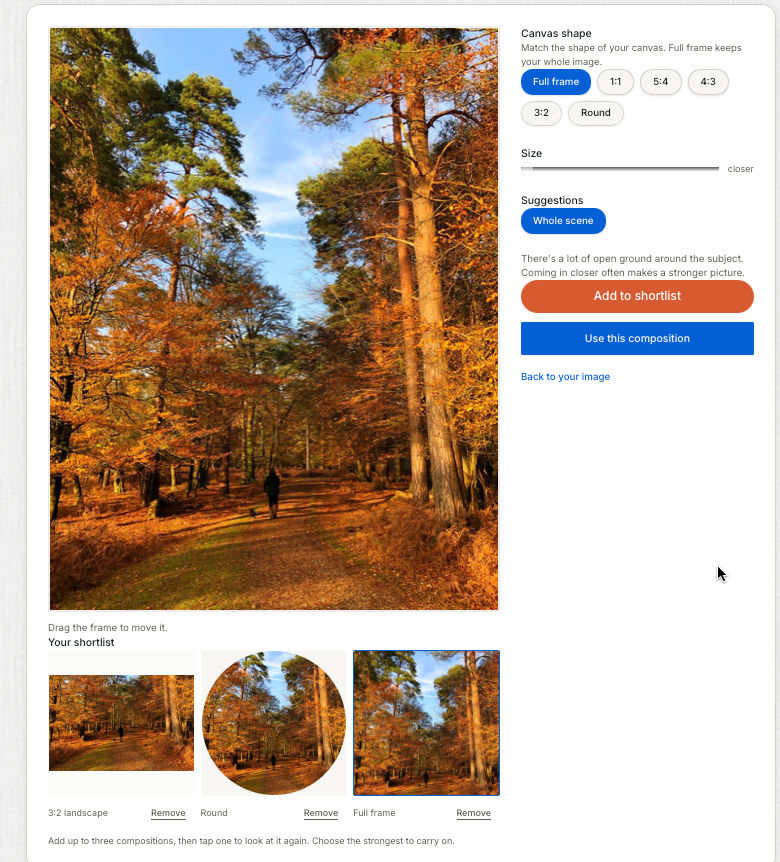
Sometimes the composition sorts itself out - but it’s always good to check. I opted for portrait.
Step 3: A painting plan for direct oils
With the look and the composition settled, my project, New Forest Autumn, opened in My studio. Here Blue reads the painting and writes a plan for the way you intend to work. I chose a direct oil approach: bold, confident marks rather than slow layered glazes.
Blue's reading picked out what this picture depends on: value drama, the sheer distance between the darkest shadows and the brightest highlights. Success, it suggested, means protecting the dark masses so that when the warm oranges go in, they appear dramatically spotlit.
Then comes the plan itself, in the order you'd actually paint it:
Ground preparation. Stain the whole surface with a thin, transparent wash of a warm earth such as Burnt Sienna, to kill the white and give an underlying warmth.
Shadow block-in. Using a dark, cool mix of Ultramarine and a little Burnt Umber, scrub in the large dark masses and the figure to lock in the composition.
Sky and canopy. Paint the blue sky and the deep greens while the shadows are still wet, keeping marks bold.
Mid-tone foliage. Mix warm ochres and burnt oranges for the bulk of the autumn leaves, saving room for the final highlights.
Light strike. Use your most opaque yellows and oranges, with a little white, for the sunlit edges and the forest floor.
Final accents. Add the smallest, darkest marks in the deepest recesses of the trunks to anchor the light and complete the value range.
This is where the "at your easel" side of ZincBlue really shows. You can Talk to Blue by speaking or typing, so you don't need to put your brushes down. Suggested questions sit right under the plan, such as How do I mix those glowing oranges?, What brushes should I use for this? and How do I keep the shadows from getting muddy? Anything worth keeping can be saved straight to My Archive.
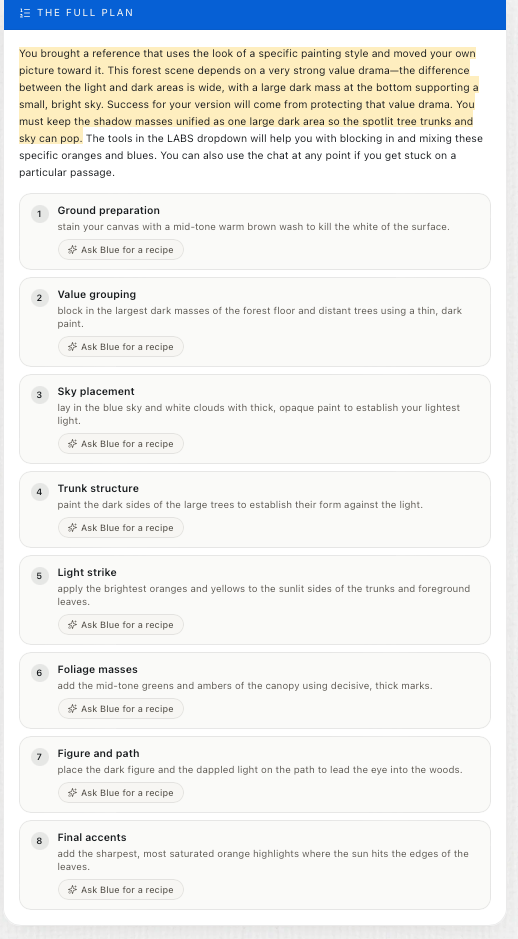
Plan like a Pro
I always paint to a plan; now you can too. Each of the stages can be clicked to get exact recipes for them with interactive help in oils, watercolour or the media you prefer to use. Zinc will even advise on exact colour mixes from a palette you set.
Step 4: Understand your colour, then place your accents
Before mixing anything, I ran the idea through ZincBlue's colour analysis. The Hue family share card shows how much of each colour family the painting uses across its whole surface, as a pie chart and a simple bar list.
The numbers told a clear story. Orange (29.3%) and Yellow Orange (28.8%) make up well over half the picture. Blue Green follows at 15.2%, then Yellow Green (9.7%) and Green (6.8%). Everything else, including Blue, Red Orange, Red Violet and the neutral darks, sits at under 3% each. You can open Smaller shares to see the tiny amounts, How the shares are measured if you're curious, and On your palette to connect the results to your actual paints.
Numbers on their own aren't advice, so Blue reads them for you. Here it spotted a strong divide between the warm orange masses and the blue-green sky, and pointed out that the two were competing to be the light source. For a picture that relies on light as its subject, you want one clean, luminous area to lead the eye. Blue then gave five practical steps with named oil colours:
Simplify the dark path with Indanthrone Blue and a little Permanent Orange for a dark, neutral mass.
Group the orange foliage into larger, simpler shapes using Cadmium Orange.
Push the light on the trunks with a thick, opaque stroke of Cadmium Yellow Medium and a touch of white.
Mute the sky edges by adding a little white to Cobalt Teal and softening where blue meets orange.
Define the figure with Dioxazine Purple to sharpen the silhouette against the path.
That last point leads naturally into accents. Those small percentages, the reds, violets and darkest darks, are exactly the colours that become your finishing notes. Used sparingly, at the right moments, they make the dominant oranges sing. ZincBlue helps you see where those accents belong, so they read as deliberate rather than accidental.
You can ask Blue follow-up questions about the colour share, and Save this card to your book to keep the analysis with your project.
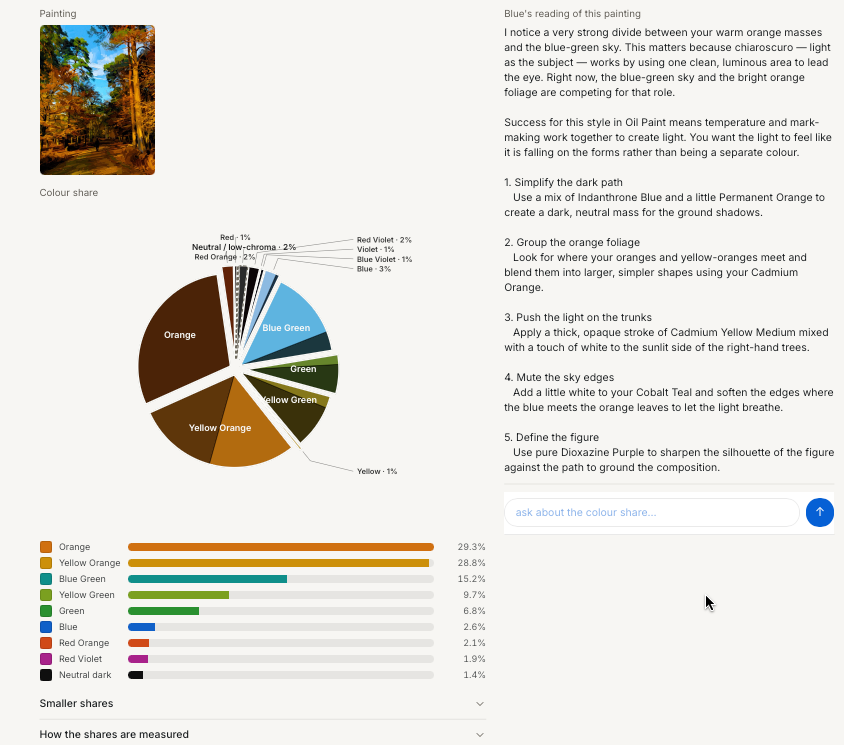
Seeing colours in the work is not the same as seeing which are important and why. ZincBlue helps with that. After a few paintings you’ll be seeing and evaluating colour relationships like a pro.
Step 5: See the options side by side
This is where ideas become visible. ZincBlue's visualising cards each change one thing at a time, and show you three versions in a row: a little less, your original, and a little more. Because only one quality changes, you can see exactly what that quality does to the picture. It's like having a colour experiment done for you before you squeeze out any paint.
Each card also explains the idea in plain language, gives Blue's reading of your painting, and offers quick questions such as How do I make it warmer? You can save any card to your book.
Temperature: cooler, original, warmer
The Temperature card shifts colours toward the warm or cool side of the colour wheel without changing value or chroma. The cooler version turned my sky turquoise and the greens icy. The warmer version pushed the foliage toward rose and red-violet.
Blue's reading was spot on for a looser, direct style: the drama should come from the vibration between the warm, glowing oranges of the light and the cool, deep greens of the shadow. Its plan included a toned ground, cooling the shadows with greens and deep violets, and placing the most vivid strokes at the focal points with a stiff brush. To shift temperature cleanly, Blue suggests using naturally warmer or cooler tube colours, or mixing with the colour wheel as your guide.
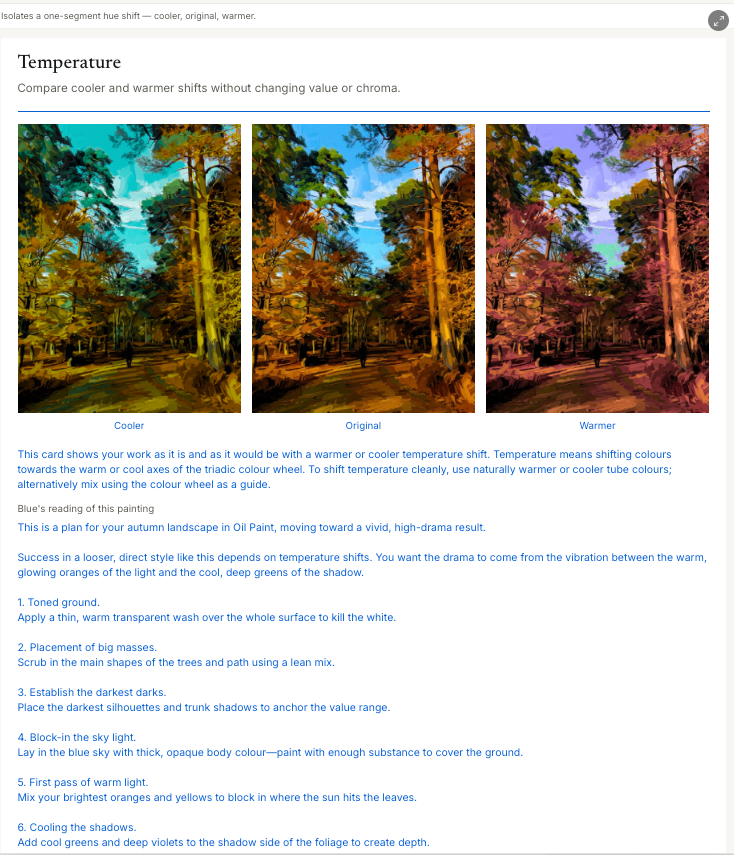
Temperature matters. We want autumn , so warmer might intuitively feel like a good choice , but is it ? ZincBlue visualises that it would shift our colour plan from blue and orange to blue and violet; not a great trade. ZincBlue lets you see how complex decisions might play out , saving time and frustration, whilst fueling your creativity
Saturation: less, original, more
Saturation means intensity of colour. The less saturated version became quiet and almost silvery, with a lovely unity. The more saturated version went bold and fiery, with reds blazing through the canopy.
Blue's practical reminders are worth taking to any easel. Saturation can't be increased by mixing, so choose unmixed modern colours for the highest intensity. Complements look more saturated when placed next to each other. Its reading of my painting was a useful check: success here means using temperature and value to lead the eye, rather than relying on high chroma across the whole surface.
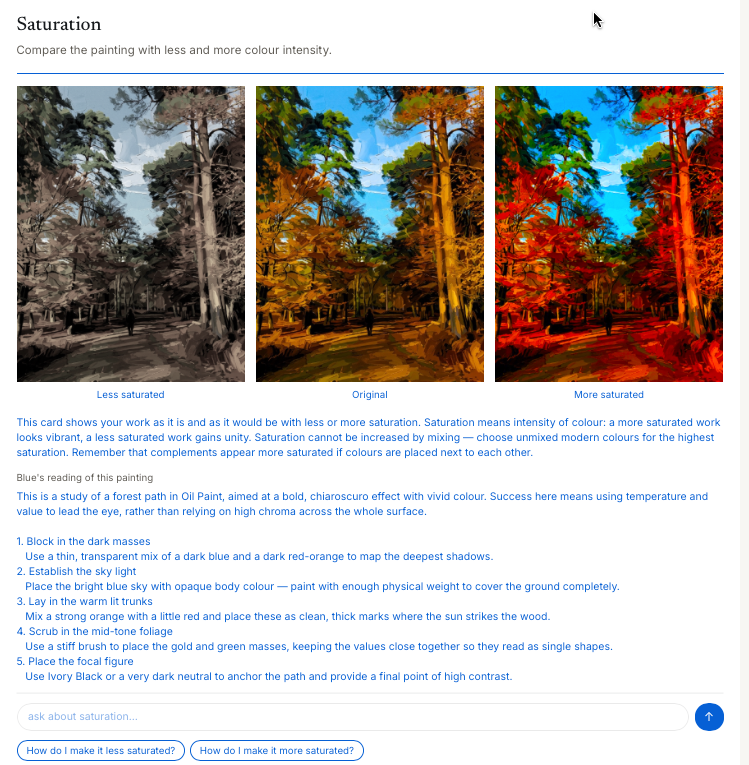
David Hockney Anyone? High saturation might work if that’s your thing - but I’d go back to blue for a long chat about style changes to pull that heightened chroma off. For our version I’ll be going for the mid with a nod to higher here and there. The colours stay within gamut by the way - so if yoyu did chose the vivid one ZincBlue would tell you the best options from your palette - modern pigments over a white ground in this case.
Value:
The Value Visualiser shows how we need to add a little more range to this. as the vivid blue sky is actually rather grey in contrast terms.
Blue explains the paint behind it: add black to make shades, add white to make tints, or glaze with black or white once the painting is dry. All of these reduce saturation and increase unity. Seeing colour and greyscale side by side makes it obvious how much of this picture's magic might come from pushing the gap between its darks and lights.
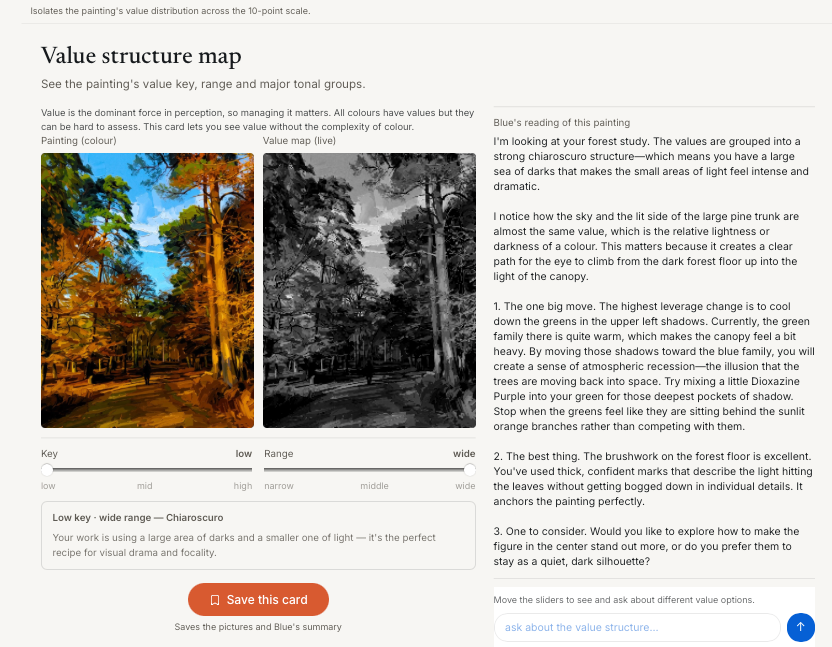
This ‘colourful’ picture is suprisingly dark, because vivid colours such as orange are not as light as most painters think. With that warning in hand its easier to see how this can be comoposed to make more of that lit trunk and patch of light in the sky.
Step 6: A block-in to see the masses, not the details
An autumn wood is full of detail: thousands of leaves, flickering light, twigs against the sky. That detail is exactly what trips painters up in the early stages. So I used the Labs dropdown in the studio to generate a block-in.
The block-in strips the scene back to its big shapes: the dark masses of the trunks and path, the large warm areas of foliage, and the clear shape of the sky. It shows you the painting's skeleton, which is what you actually need to get right in the first hour at the easel. Once the masses are in the right place and the right value, the detail can come later, and much less of it is needed than you'd think.
The Labs are there whenever you need to block in shapes or work out a specific colour mix, and you can talk to Blue about them while you paint.
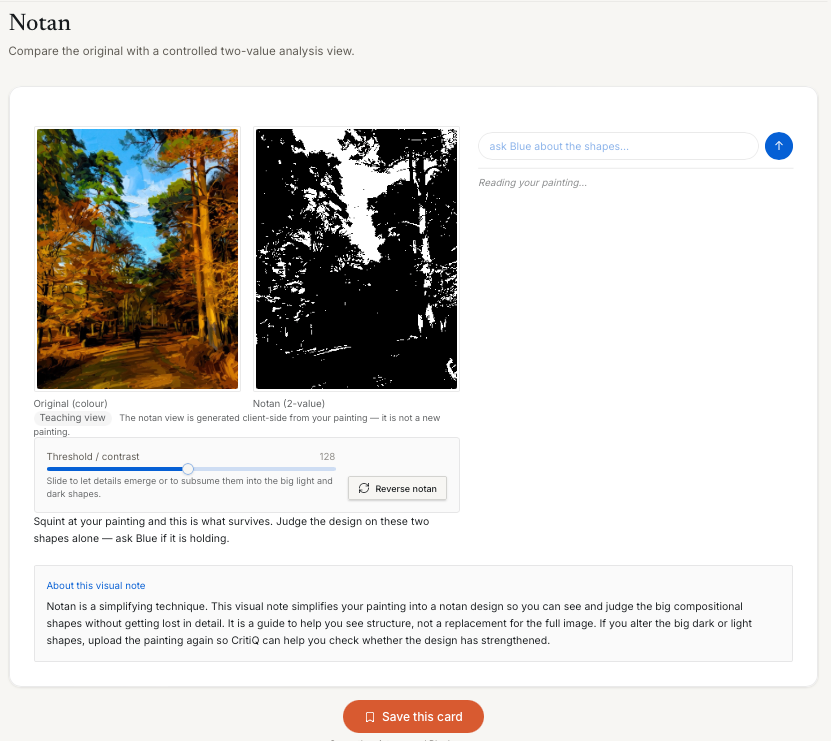
Notans are the best way to see value structure. ZincBlue lets you adjust them until you have the insights you need to mass the work compositionally.
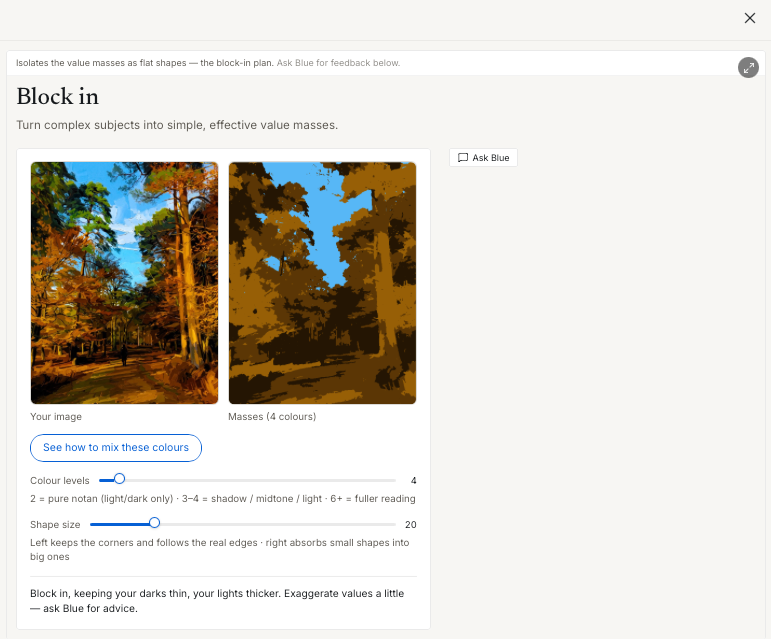
Colour blocking is a great way to keep your work looser, you’d be suprised what you dont need to detail. If you need more detail , fewer or more colours or even mixing advice - it’s all there
Step 7: Making my choice, and making yours
After looking at all the options, I chose to keep the tall composition, work directly, add more value contrast by massing the darks, add some extra punch to that foreground tree, and made a note to decide about the strength of ther sky as I worked - it may create too many focal areas; but no work can be fully planned which is why its great to know that I can breing whatever I paint back into ZincBlue down the line for specific help.
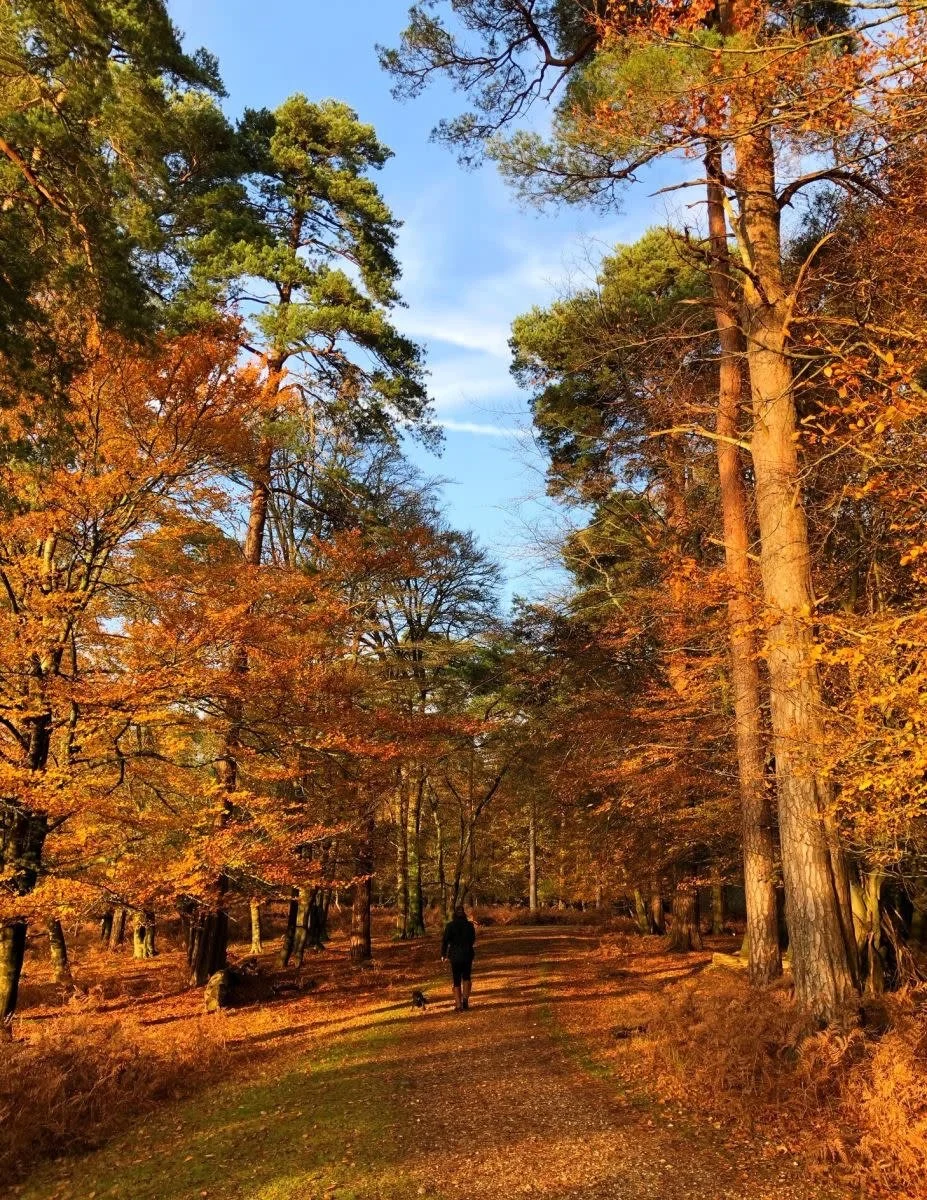
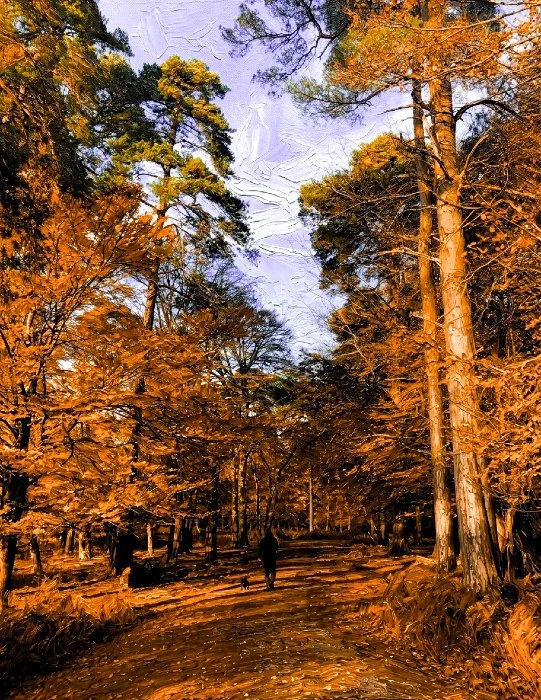
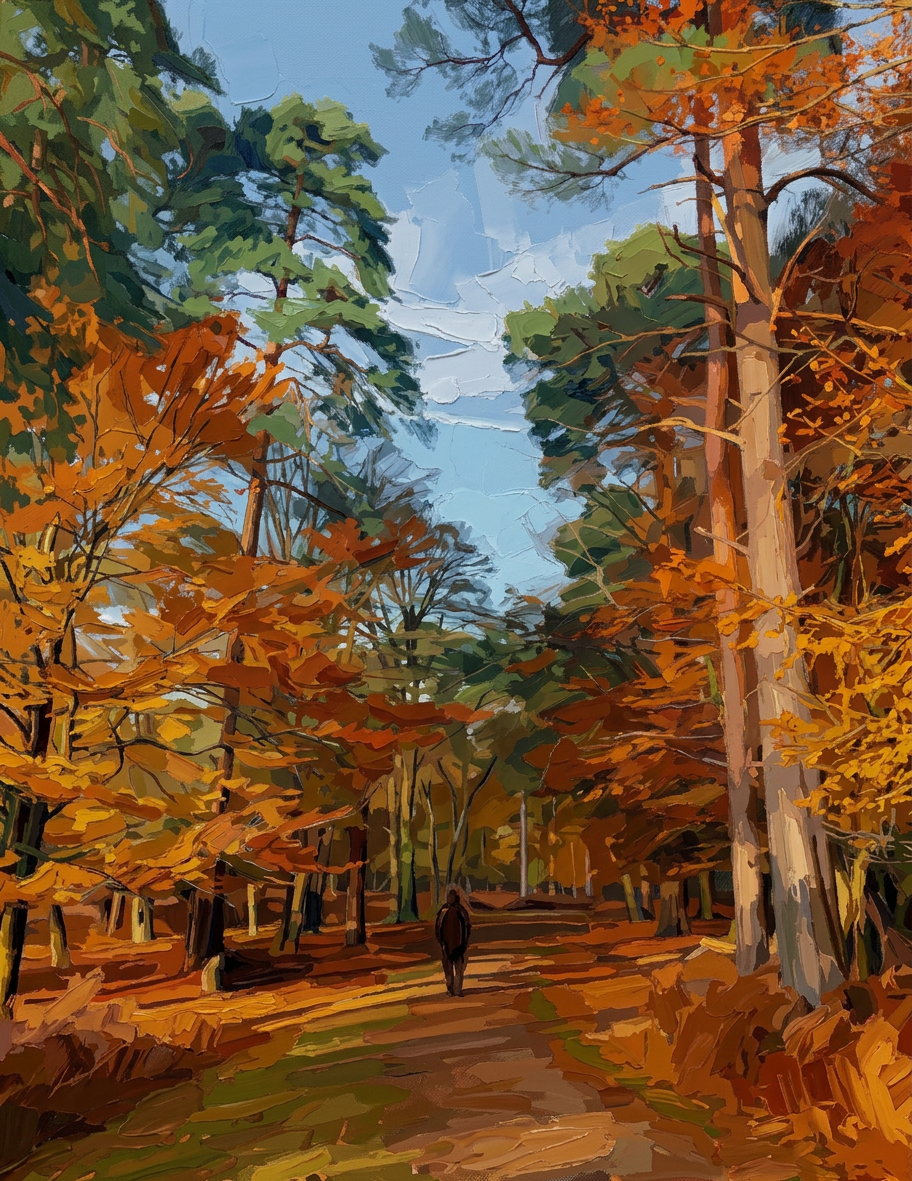
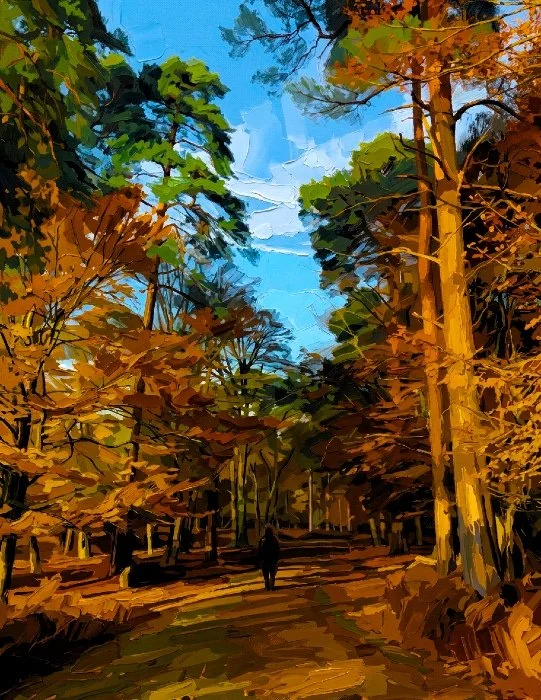
And that's the point. ZincBlue never told me which version to paint. It showed me what was possible, explained why each option works, and then turned the one I chose into a plan I could follow at the easel, step by step, with named colours and practical advice. The ideas stayed mine. Blue simply made sure I could see them clearly and act on them confidently.
Try it with your own project
You don't need a perfect photograph or a grand idea to begin. Here's a simple route through ZincBlue:
Join ZincBlue (or join the waitlist: we’re set to launch in Autumn 2026)
Start a new painting and choose your medium.
Add a look you love, or skip and paint your reference as it is.
Try a few compositions in the Composer and shortlist up to three.
Read your colour analysis and Blue's suggestions for accents.
Compare temperature, saturation and value, one quality at a time.
Generate a block-in to see the big masses.
Talk to Blue at the easel, by voice or text, and save what you learn to your archive.